Showing posts with label Tech. Show all posts

11 February 2016

What's Happening at Google I/O 2016: Predictions and Wishes


1. Smart features and material design for Google Calendar web


This is LONG overdue, and I can’t imagine that they wouldn’t launch it this year. The Android app is beautiful, and I’m eager for the web app to catch up. Also, Google acquired Timeful, an iOS app, about a year ago. It was smart enough to look at your schedule and suggest times to squeeze in your habits and to-do items. It's going to be awesome to have these features integrated into Google Calendar. I’m 95% sure this will happen at Google I/O 2016. In fact, I expect it to be kind of a headline item.

2. Cast from the Google Drive app


This is for movies mostly. It’d be nice to rip your old DVDs, store them in Drive, and cast them whenever you feel like it. It’d also be nice to share Docs and Sheets in the board room. I’m 52% sure this will happen at Google I/O 2016.

3. Audiobooks (and podcasts) for Google Play Music


We know podcasts are on the way, and I’m stoked about it. And while I’m at it, I’ve decided to hope that Google adds integration for audiobooks while they’re at it. An audiobook and a podcast are essentially the same—they need to save your place and let you adjust playback speed. For audiobooks, Google would just need to include two things: First, let you upload your own mp3 audiobooks to the cloud and group the files as a single book. Second, the Play store would need to let publishers start selling audio through that platform. I’m 100% sure that at least 50% of this will happen at Google I/O 2016.

4. New features for Google Play Books


First, the Play Books app should stop looking old and ugly. It’s gone on for far too long. Next, Play Books needs to add a few catch-up features so it’s on par with the Kindle app, like tracking your reading speed and predicting how long it’ll take you to finish a book. Also, Play Books needs a decent search feature. (Right now the search bar only searches the store and not your own library!) But I’ve got my fingers crossed for even bigger things. I want Play Books to become the iTunes of ebooks. Let me organize my library, change titles and authors and cover art if I want, and, most importantly, genres! And let me make playlists, e.g., “my top ten fiction” or “books to read next”. (Playlists should also let you add books you haven’t purchased yet—this would be good for the users and for the Play Store.) I’m 12% sure that this will happen at Google I/O 2016.

5. Chromecast becoming bigger than WiiU


The new Chromecast’s biggest feature, in my mind, is low latency. That means your phone can communicate with your TV very, very quickly. This doesn’t matter when you’re clicking play on a movie, but it DOES matter if you’re timing a jump in a platformer. Low latency turns a $35 Chromecast into a powerful gaming console, a console that could quickly and easily become cooler than Nintendo’s WiiU. Phones are universal—it’s like everyone’s carrying a game controller in their pocket. Which means Chromecast gaming is poised to be HUGE. All we need is some decent games on it. At the last Google I/O, they showcased a group of people playing Angry Birds GO through Chromecast, but that game never launched this feature publicly. I’m 89% sure that we’ll be getting some sweet new Chromecast-enabled games on the Play Store at Google I/O 2016.

---

Runners up:


6. Something cool happens to Blogger. I’m like 100% sure this will NOT happen at Google I/O 2016.

7. Android will merge the Apps button with the Home button. (I.e., when you’re on the home screen, tap home again to see your apps. Well, a UX designer can hope, can’t he? I just hate having that static, unmovable icon in the middle. It’s one of the last, lingering pieces of the original, ugly OS design.) I’m like 100% sure this will NOT happen at Google I/O 2016.

8. Chrome for desktop gets the SHARE ICON that’s so useful in Android. I can’t tell you how often I’ve wished for that. I’m like 4% sure this will happen at Google I/O 2016.

9. Photos lets you tag faces. I’m like 100% sure this WILL happen at Google I/O 2016. And I'm excited.

10. Google Drive now gives you, I dunno, 100 GB for free. Or 1 TB would be nice. I’m like 80% sure this WON’T happen at Google I/O 2016. Here's hoping.


Thanks for reading.

Let's hear your wishes in the comments!


29 June 2014

Michael Crichton Ebook Covers: Jurassic Park, Congo, Timeline

For some reason the Michael Crichton ebooks aren’t being published with the same awesome covers I owned when I was a kid. And here’s what they look like if you buy them from Google Play, yeck:


I’m a little OCD about my ebook collection, so I rebranded a few of them. Here are the Jurassic Park, Timeline, and Congo covers I created based on the original paperbacks.


14 May 2014

How to Hire the Best Book Editor for Free: Crowdsource Editing


My friend Sherry asked me for a recommendation on a professional editor.

I told her I didn’t have one.

Now, if you haven’t read my books yet, you might be tempted to think they’re full of errors. They aren’t. In fact, I dare you to find one.

And no, it’s not just because I’m a great editor. I’m a decent editor. I’m not bad. However, my skills decrease when I’m editing my own stuff. It’s just hard to notice errors in a manuscript you’ve already read so many times.

Here’s the secret: I have smart and generous friends.

I’m serious.

And these aren’t English-major friends either, at least most of them aren’t.

The truth is that I’d like to pay a professional editor, but it doesn’t fit into my fledgling-author budget. I expect it will sometime in the future. However, this process, which I’m about to explain, has worked so well that I might never switch to traditional editing.

And, again, it’s all because I have awesome friends and fans.

These are the same friends who’ve found errors in the Harry Potter books—stuff the professional editors missed. And they’re my heroes.

06 May 2014

How to Learn Spanish with Video Games like Tomb Raider


Lara Croft es una Española.

You thought the Tomb Raider was British, didn’t you?

Well, she’s not. She’s from Spain.

At least she is in the one I’m playing.


WHY PLAY TOMB RAIDER IN SPANISH?

31 March 2014

Top 5 Best Platform Games for Android

I recently took a road trip to Mexico for my sister’s wedding. This included about 33 hours of driving—I drove a little, but mostly I was a glass passenger. Which left plenty of time to kill.

I did some reading. Listened to the Wool audiobook. And then I played some platformers. After extensive research, these are the best I’ve found:

UPDATED 31 MAR 2014


#6 Naught


Okay, so I’m giving you a bonus game, because Naught is too awesome to leave out.

Naught is mostly cool because it uses gravity to control the experience in 360 degrees. So you rotate your phone all the way around to make the character fall through the level. It’s sweet. Really challenges your usual perspective of up and down. And the artwork’s not bad either. It’s not your typical platformer, but I still thought it was worth mentioning.


#5 Sonic 2 (and Sonic 4


I’m kind of partial to Sonic 2, because I played it at my neighbor’s house when I was a tiny kid. It works pretty well on mobile. It’s fairly easy to control, and it’s not a 10-minute mind-numbing game like Angry Birds. This is a real game. 

Sonic 4 is an update to the original. And they’ve made some nice visual improvements: it’s 2.5D and looks great on a fast phone. 

(I don’t like Sonic as much as Mario, but these are foundational to the platformer genre.)


#4 They Need To Be Fed 2 (and They Need To Be Fed)


This also breaks away from the classic model by moving in multiple directions instead of simple side-scrolling from right to left. The artwork is classy too, and that’s a big one for me. The gameplay is super fun. But thinking upside down takes some getting used to. Definitely worth a dollar. In fact, I’d say it’s worth more than a dollar. I really li

22 March 2014

How to play CURSE OF MONKEY ISLAND and other LucasArts Archives on Android (ScummVM)


UPDATE Jun 2021 - MEMENTO MURRAY POSTER: We're doing a limited print run of the Memento Murray poster. If you'd like to have this bad boy hanging on your office wall, constantly reminding you that your future looks grim, email typos@jwashburn.com and ask for more details. 


UPDATE 22 Mar 2014: I figured out that you can turn it into a direct touch interface (rather than the trackpad interface). Go to Options>>MIDI then check the [✓] Mixed AdLib/MIDI Mode. That made a world of difference! Also, two-finger touch is right click. Back button is ESC. And press and hold the three options dots to bring up the keyboard so you can skip dialog and stuff.


ORIGINAL ARTICLE:


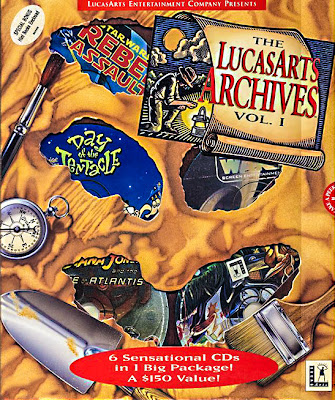
I cannot tell you how excited I was to get The LucasArts Archives Vol. 1 when I was a kid. My older brother and I both chipped in money from our limited savings (this was 1995). It was like a real buried treasure—seriously, I was that giddy (partly because of the box design).

The adventure games in particular were my favorites. I later bought Vol. 2 (1996) and Vol. 3 (1997). And they became a big part of my childhood—as ingrained as some of my favorite books. I still quote some of the funny lines: “Stop him, Sam! He’s gonna tell us a story!”

20 December 2013

Republic Wireless Moto X Review (and Plans)


About a month ago, I signed up with Republic Wireless. (Read my review of their service and plans.) Now I want to tell you more about their Moto X phone.


The Pros and Cons

Does REPUBLIC WIRELESS Work?


A couple weeks ago, I signed up for Republic Wireless

If you haven’t heard, they’re a cellular provider that offers unlimited calling and texting for just $10/month. Also, it’s not a contract, so you can quit at any time.


How do they offer such ridiculously low prices?

Republic Wireless uses a new hybrid service that makes calls on WiFi when possible. And most people make about 95% of their calls (I made that stat up) while they’re in WiFi range. Making calls through the internet is nothing new. But Republic switches seamlessly between WiFi and cellular—which hasn’t been done before. For example, let’s say you make a call at home (on WiFi) and then you hop in your car and drive off. You won’t even realize when your Republic phone makes the handoff to cellular—it’s that smooth.


What phones can I use on Republic Wireless? 

07 September 2013

7 Changes Coming to Google Books at I/O 2014


Google Play Books has gotten a whole lot better in the last few months. In fact, I’ve stopped using the Kindle app almost entirely. Of course, Kindle still has free book promotions, which I often grab but never read. They also have great sales sometimes. But when I can, I transfer these to Google Play Books. (But sometimes the DRM won’t let me, which is another frustration I have with Kindle.)

03 September 2013

07 August 2013

Use Google Drive to Make Your Own Ebooks and Sooth Your OCD

I converted Bentley’s master’s thesis to an ebook. I also converted a web page that was as long as a novella to an ebook. I’ve done it with a few classics too. It’s because my OCD demands an easy reading experience and, most of all, sweet cover art (yes, I judge books by their covers, which is why I’ve never read Brandon Sanderson’s Alcatraz books—but he said new covers are coming soon).

When my buddy Joel asked me how it’s done, I decided to blog it to share with the likes of you.

If these instructions aren’t crystal clear, leave a comment, and I’ll help you out.


FIRST

Download and install Sigil (it converts .html to .epub)
Download and install Calibre (it’s like iTunes for ebooks)


13 June 2013

The Easy Way to REFUND A KINDLE BOOK Purchase

First, you have seven days to return a Kindle book. So don’t procrastinate. Here’s what to do:

1. On Amazon.com, click Shop By Department >> Kindle >> Manage Your Kindle.

08 May 2013

How to read ebooks without a Kindle


Did you know you can read ebooks without a Kindle?

And it’s free too.

Here’s how...

07 May 2013

ANDROID: REBRANDED


Sundar Pichai recently became the lead of the Android team. I’m excited to hear his keynote address at the upcoming Google I/O 2013 (15 May). His work with Chrome has been incredible (Chrome may be Google’s most ground-breaking yet polished product yet). A lot of great things will be coming to Android now too—as it’s merged into the Google family more fully. (Below you’ll see a side-by-side comparison.)

06 May 2013

27 NEW FEATURES coming to GOOGLE MUSIC at I/O 2013

Logo rebrand by Sam Bathe.


I’ll admit right up front that I don’t have any insider knowledge here. I’m just a keen observer and an avid Google watcher. But, just so you know, I predicted Google Music 2 years and 1 month before it was released. Just saying.

I replaced iTunes with Google Music about 8 months ago. It’s been great so far. It beats iTunes in a ton of ways. First it gives you 20k songs in the cloud—FOR FREE! So I can access my music from home, my office, the podium where I teach, my phone, or my friend’s Nexus 7. It’s awesome to have your music everywhere. (And did I mention it’s free?)

I’ve also purchased and have been using Apple’s iCloud for 8 months too, and I prefer Google Music in almost every way. Having said that, Google Music needs to change a few things in order to catch up—gaps between what we expect from a music manager and what Google has given us...

So far.

I have a feeling these updates are coming at Google I/O 2013:

04 February 2013

What I Expect at Google I/O 2013

(Google I/O is scheduled for May 15-17, 2013—and it only took 20 minutes for tickets to sell out! Now, below are the speculations of a Google Maniac—all of this is sure to come eventually, but is spring too soon to hope for?)


14 January 2013

On Stranger Tides: Is an eBook worth it?

 
I posted my farewell to physical books a few weeks back. Well, last night I finished reading my first ebook!

While I love the texture and smell of a real book, here’s what I like about ebooks:
  1. Carrying a whole library in your pocket wherever you go is hard to beat (makes me feel like Merlin from The Sword in the Stone). 
  2. It’s not heavy or cumbersome to hold above your head as you lie on your back.
  3. If you use your phone, you can read at night without a light.
  4. You can press-and-hold any given word to see the dictionary’s definition.
  5. You can highlight a passage even when there isn’t a pen or pencil in this entire stinking house, much less one within leaning distance.
  6. Your bookmarks sync to the cloud, so you can throw your phone in a river (if you’re the adventurous type) and still not lose your spot!

Now, let me tell you about the book I read:

27 August 2012

Lost Winds iPhone Game Review

  Or 

How to Procrastinate Writing Your Master’s Thesis


Story
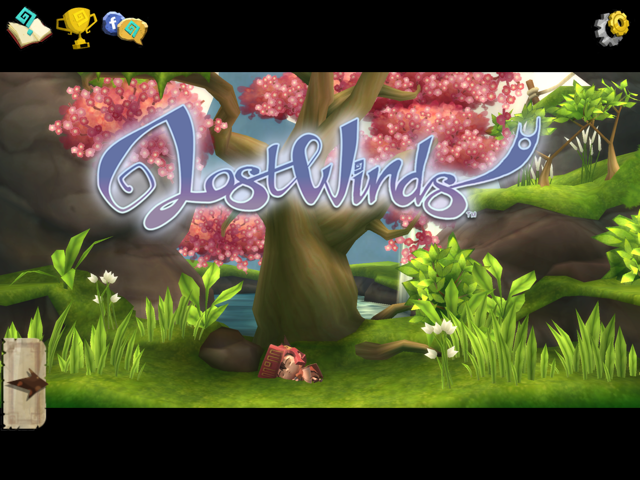
I consider story a big part of the game’s artfulness. This story is minimal, mostly because the game is rather short. But at least the story’s there—unlike the hoards of shallow mobile games out there. The plot, in fact, reminds me of a Zelda game—a simple but fun quest story where you, a boy named Toku, follow a map searching for artifacts. Toku is an apprentice who has lost his voice but is trying to save the land (from an evil god) using the power of the winds—which you get to control more and more throughout the game.

Art
The visual art is impressive too. It’s built on a 2.5D environment—a side-scroller (2D) in a 3D world. It’s cool how you can call down the wind to interact with characters in the 3D background too. Overall, the visuals are beautiful—in fact, that’s what called my attention to this game to begin with.

18 July 2012

You Can Post on Blogger by Writing an Email


You can post emails directly to your blog, automatically! (This will be helpful to any LDS missionaries who want to share updates without breaking rules or adding any hassle.) Here’s how: